01.Myntra Image Guidelines Summary
Before we dive into the nitty-gritty of why your perfect shots might be getting kicked back, let's get the core Myntra image guidelines out of the way. These are the absolute, non-negotiable specs you need to hit just to get your foot in the door. Here they are, so you know exactly what to tell your photographer, or what to look for when reviewing your own AI-generated catalogue. Skimp on any of these, and you're just asking for trouble, trust me.
| Aspect | Requirement | Details |
|---|---|---|
| Aspect Ratio | 1:1 Square | Mandatory for all images. |
| Minimum Resolution | 2000 x 2000 pixels | Higher is always better for zooming. |
| Maximum Resolution | 4000 x 4000 pixels | Maintains file size efficiency. |
| Background | Pure White (RGB 255,255,255) | No shadows, gradients, or off-white tones. |
| File Format | JPEG/JPG | High quality, minimal compression. |
| File Size | Under 1MB | For fast loading times. |
| Model Type | Human (real or AI) | Cannot be mannequins or flat lays for main images. |
| Product Focus | Garment must fill 70-80% of frame | No distracting elements. |
| No Text/Logos | Absolutely Forbidden | Clean, product-only presentation. |
This table is your cheat sheet. Stick to it. Deviate at your own risk. Now, let’s explore the common pitfalls where even experienced sellers, who think they know the rules, still manage to mess up.
02.1. The Strict 1:1 Aspect Ratio Is Non-Negotiable
Myntra demands a perfect square, 1:1 aspect ratio, for every single image in your product listing, and this isn't a suggestion; it's a hard rule that often trips up sellers transitioning from other marketplaces where 3:4 or 4:5 ratios are common. Imagine setting up a gorgeous vertical shot for Instagram, then just trying to cram it into a square frame – it doesn’t work, right? Myntra’s system is designed for a consistent, clean grid layout across its app and website, and anything less than a precise square will either be rejected outright or awkwardly cropped by their auto-processors, potentially cutting off crucial parts of your garment or model. A styled kurti can lose its flair when the hem is cropped out during an automated resize; it looks amateur and reduces buyer confidence. Always plan your shots from the get-go with this square format in mind, whether you're in a studio in Mumbai or using an AI tool to generate your saree catalogue photography.
03.2. Pure White Background, And That Means *Pure*
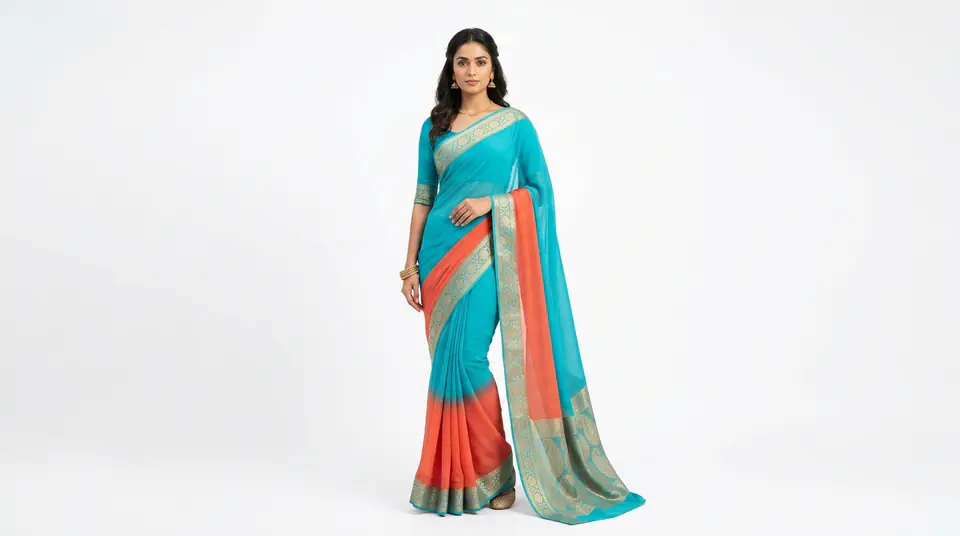
Your background absolutely must be pure white, specifically RGB 255,255,255, without any hints of grey, off-white, or subtle shadows. This isn't just about aesthetics; it's about Myntra's brand consistency and their algorithms for product display. A slight shadow under the model's feet might look 'natural' to you, but to Myntra's QC, it's a rejection waiting to happen. A background that looks white to the eye can still carry a slight tint on a light meter. Even a barely perceptible gradient from studio lighting can get flagged. The easiest way to achieve this, without spending hours in Photoshop trying to mask out your model perfectly (a nightmare, trust me), is to either shoot against a professionally lit white cyclorama wall or, more efficiently, use an AI tool that automatically places your garment on a flawless white backdrop. This ensures every product image looks crisp, uniform, and compliant, no matter how many SKUs you’re pushing.
04.3. Minimum Resolution & Cropping: No More Guesswork
Myntra requires a minimum resolution of 2000x2000 pixels, but honestly, aim for 3000x3000 or even 4000x4000. Why? Because higher resolution means better zoom capabilities for customers, which directly impacts their ability to inspect fabric texture, stitching details, and embellishments – vital for Indian ethnic wear like lehengas and intricately embroidered kurtis. If your image is too small, shoppers can't zoom in effectively, leading to doubts and potentially abandoning the purchase. On the flip side, don't just upscale a low-res image; that’s a surefire way to introduce pixelation and blur, which is another common QC rejection. The product, whether it's a stylish dress or a traditional kurta, needs to occupy 70-80% of the frame. This ensures the garment is the star, without too much empty space around it. You want buyers to see the actual product clearly, not a tiny speck on a large canvas. It's about presentation, making sure your item jumps out, not hides.
05.4. Model Pose and Expression: The 'Natural & Graceful' Rule
Myntra is particular about how models present your clothing. They want 'natural, graceful, and elegant' poses, not overly dramatic, overtly sexy, or bizarre editorial shots. Think catalogue, not couture runway. Your model should be standing or in a simple, gentle pose that clearly showcases the garment’s fit, silhouette, and movement. No extreme angles that distort the clothing, no awkward body language, and definitely no faces obscured by hair or hands, unless it's a deliberate, minor styling choice. Facial expressions should be neutral or subtly pleasant, making the product relatable and aspirational without being distracting. This is where AI models really shine for ecommerce product photography – you can get consistent, compliant poses and expressions across your entire catalogue without the variability of human models on a long shoot day, or the risk of your photographer getting 'creative' when Myntra just wants 'clean'.
06.5. Garment Fit and Presentation: It's All in the Drape
The way your garment looks on the model is absolutely critical for Myntra approval and, more importantly, for sales conversion. Apparel must be perfectly fitted, wrinkle-free, and styled appropriately. No bunching, no pulling, no visible pins, clips, or creases. This isn't just about looking good; it directly impacts how accurately a customer perceives the fit and fabric of your product. If a beautiful georgette saree looks stiff or ill-fitting because of poor styling or a bad pose, customers won't trust what they're seeing. For categories like sarees, dupattas, and lehengas, the drape needs to be flawless, showcasing the fall and fluidity of the fabric. This attention to detail reduces returns and increases customer satisfaction because what they see is precisely what they expect to get. Invest time here; it pays off more than you think.
A poorly draped garment is a major QC flag. For ethnic wear, especially, practice different drapes or use AI models that perfectly simulate fabric flow to avoid rejections.
07.6. No Watermarks, Text, or Collages – Keep It Clean
This is a straight-up, instant rejection category: absolutely no watermarks, text overlays, logos, branding, or promotional messages on your main product images. Myntra wants an uncluttered shopping experience, where the product speaks for itself. They don’t want anything distracting from the apparel. Similarly, image collages – where multiple photos are stitched together – are a big no-no. Each image must be a standalone, high-quality photograph of your product. This means you can’t show a close-up of embroidery and a full shot on the same image plane. If you want to highlight details, use separate images in your carousel. This rule is designed to maintain a premium, uniform aesthetic across the entire Myntra platform, and violating it is one of the quickest ways to get your listing sent back to the drawing board. Keep it clean, keep it simple, keep it product-focused.
08.7. Consistency Across Product Variants: Don't Mix & Match
Consistency is key when you’re listing multiple colour or size variants of the same product. Myntra expects the presentation of all variants to be virtually identical: same model, same pose, same lighting, same background, and same overall styling. If your purple kurti is shot on a model with her hand on her hip, your green kurti of the same style should not have the model looking over her shoulder. This goes for hair, makeup, and even accessories. Inconsistency confuses customers and indicates a lack of attention to detail, which Myntra sees as unprofessional. This is where traditional photoshoots become a headache; coordinating multiple reshoots for a new colour variant is a logistical and financial nightmare. This is also where DrapifyApp saves you. You can literally generate colour variant photos with AI models in minutes, ensuring perfect consistency every single time, without the hassle or expense of multiple studio days.
09.8. The "Reshoot Tax" on Quality Control Failures
Every time Myntra rejects your images, you're not just losing time; you're paying a 'reshoot tax.' Think about it: a rejected catalogue means you either have to pay your photographer for another shoot day (if they're even available), or spend hours trying to fix images in post-production. Each reshoot costs money for models, studio time, stylists, and editors. For a typical small brand in Ahmedabad, a single rejected catalogue for a festive collection could mean a ₹15,000-₹30,000 hit just for corrections, plus a delay of days or even weeks. That’s sales lost, inventory sitting idle, and momentum crushed. QC rejections during Diwali season can mean missing peak sales for bestselling sarees. This hidden cost eats into your margins and slows down your entire operation. The goal isn't just to get approved; it's to get approved the first time.
₹15,000-₹30,000
Typical cost of a rejected catalogue correction
3-7 Days
Average delay for reshoot and re-approval
12-18%
Estimated lost sales due to delayed listing
10.9. Jewellery and Accessories: The Close-Up Details You Need
If your product includes jewellery or accessories (think a statement necklace with a kurti, or earrings with a lehenga), Myntra expects separate, high-quality close-up shots for these items if they’re sold as part of the package or meant to be highlighted. Simply having them on the model in the main apparel shot isn’t enough. These detail shots need their own perfect white background, clear focus, and excellent lighting to showcase the craftsmanship. For jewellery product photography, this means minimizing reflections, ensuring proper depth of field to keep the entire piece sharp, and capturing its true metallic sheen or gemstone sparkle. Many sellers forget this, assuming the main image covers everything. But Myntra understands that buyers want to inspect smaller items just as carefully as they do the main garment. Don't let a tiny accessory derail your entire listing; give it the dedicated attention it deserves.
11.10. The Biggest Reason for Rejection: Blurry or Low-Res Images
Honestly, the most common and frustrating reason for Myntra image rejection is also the simplest to fix: blurry, pixelated, or simply low-resolution images. It sounds obvious, right? Yet, time and again, sellers upload catalogue photos that just aren't sharp enough. This often happens when images are resized incorrectly, compressed too heavily to reduce file size, or shot with inadequate lighting or a shaky hand. Your product, its fabric, embroidery, and details, must be crystal clear when viewed at 100% zoom. If it looks soft or fuzzy, it’s going to get rejected. Myntra values clarity because it builds trust with their customers. Make sure your camera settings are right, your lighting is ample, and if you’re using AI tools, ensure you're generating images at the recommended resolution. A blurry image says, 'I don't care enough about my product,' and Myntra definitely doesn't want that on its platform.
12.11. Failed Lighting and Colour Accuracy: Seeing Is Believing
This isn't just a Myntra rule; it's a fundamental principle of ecommerce photography. Your product images must have accurate colour representation. If your beautiful Rani Pink silk kurti appears dull fuchsia or even slightly orange in your catalogue photos, that’s a massive problem. Inaccurate colours are a huge driver of returns because the customer receives something that doesn't match their expectation, and for sellers, every return means lost shipping costs, processing fees, and damaged reputation. Myntra's QC often checks for over-exposure, under-exposure, and colour casts (like a blue tint from bad studio lighting). Proper white balance is critical, both during the shoot and in post-production. This is a common flaw in DIY phone photography, where ambient light can severely distort colours. Investing in a colour-calibrated workflow, or using AI platforms like DrapifyApp that ensure consistent and accurate colour rendition across all images, will save you a world of pain and preserve your sales.
13.12. Batch Upload Pitfalls: A Single Bad Apple Can Spoil the Crate
When you're uploading a large catalogue, especially during peak seasons like Diwali or Eid, it's tempting to rush and push everything through. But here’s the kicker: Myntra's QC often reviews listings in batches. If even one image in a set fails their guidelines – say, a blurry shot of an embroidered blouse or an inconsistent model pose for a new colour variant – the entire batch can get held up or rejected. This creates a bottleneck that slows down your entire launch, affecting multiple SKUs. It’s far better to meticulously check every single image before uploading than to deal with the cascading effects of a batch rejection. Think of it as a domino effect: one small oversight can knock down your whole catalogue. A disciplined, pre-upload review process for every single file is non-negotiable for smooth sailing on Myntra.